Bring Back the Classics: Editable Retro Jukebox Labels Template
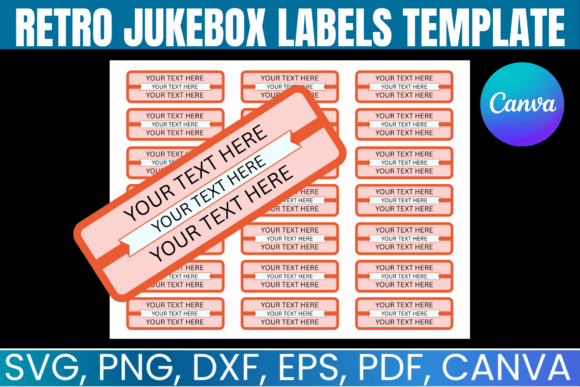
There’s a certain magic to a vintage diner or a well-loved bar—the kind of place where the music is always good and the atmosphere feels timeless. One of the most iconic symbols of that vibe is the jukebox, specifically the colorful, bold labels that displayed the song titles and artists. If you’re looking to capture that nostalgic feel for your own space, project, or brand, the Editable Retro Jukebox Labels Template is a versatile design asset that makes it simple. This isn’t just a static image; it’s a fully customizable tool designed to give you the authentic look of a classic jukebox label with modern flexibility.
More Than Just a Template: A Design System for Nostalgia
At its core, this template is a premium font and design system focused on one specific, powerful aesthetic. The visual personality is unmistakable: it draws from the bold, rounded letterforms of mid-century display type, the kind you’d see on a 1950s Wurlitzer or a 1960s Rock-Ola. The style is cheerful, slightly condensed, and built for impact. It’s a creative font that doesn’t whisper; it sings. The appeal lies in its ability to instantly communicate fun, music, and a sense of classic Americana. It’s not a delicate serif font for long-form reading or a clean sans serif font for corporate reports. This is a display font at heart, engineered for headlines, titles, and moments where you need to grab attention and set a mood in an instant.
The true strength of the Editable Retro Jukebox Labels Template is its practicality. It arrives as a complete package, including SVG, PNG, DXF, and PDF files, alongside a fully editable Canva file. This means you’re not just buying a picture of a label; you’re getting a set of design assets that work with the software you already use. Whether you’re a crafter using a Cricut or Silhouette machine to cut vinyl decals, a small business owner designing menus in Canva, or a graphic designer working in Adobe Illustrator, the files are compatible. This cross-software functionality is crucial for maintaining a consistent brand identity across different applications, from a physical label on a wall to a digital graphic on social media.
Where This Retro Style Truly Shines
Thinking about where to use this template opens up a world of creative possibilities. Its most natural home is, of course, with actual jukeboxes—whether for a home game room, a themed party, or a commercial establishment. But its applications extend far beyond that. For packaging design, imagine using these labels on a craft soda bottle, a bag of gourmet popcorn, or a vinyl record sleeve. The retro aesthetic instantly suggests quality, nostalgia, and a handcrafted feel. In editorial design, a magazine feature about music history, a restaurant review, or a blog post about vintage culture could use these labels as spot illustrations or chapter headings to reinforce the theme.
For entrepreneurs and marketers, this template is a secret weapon for creating engaging social media graphics. A post announcing a “Throwback Thursday” playlist, a featured artist, or a weekly special can be elevated from a simple text overlay to a visually compelling piece of content that stops the scroll. The consistent use of this style across your digital platforms helps build instant recognition. It tells your audience, “We’re about good times, great music, and a classic vibe.” This is how a simple font pairing—using this display font for headlines with a clean modern typography body copy—can shape entire brand perception, making it feel more approachable, fun, and memorable.
Practical Guidance for Using Your Jukebox Labels
Before diving in, it’s wise to evaluate if this style is the right fit for your project’s goals. The Editable Retro Jukebox Labels Template excels when you want to evoke a specific era or emotion. It’s less suited for projects requiring a formal, serious, or ultra-minimalist tone. Once you’ve confirmed the fit, the real work begins in customization. The editable Canva file is a game-changer for those without advanced software. You can use the simple drag-and-drop interface to change song titles, artist names, and even colors to match your specific palette. This allows for quick iteration and ensures the final product feels uniquely yours.
A critical consideration is readability. While the font is bold, always test your final design at the intended viewing size. If you’re creating labels for a wall menu, print a test page and view it from the average customer distance. Ensure the contrast between the text and the background is high enough for easy reading. For digital use, like a website banner or social media post, check how it renders on both desktop and mobile screens. Pairing this strong display type with a simpler, more legible font for body text is a fundamental typography principle that prevents visual clutter and guides the viewer’s eye.
Finally, understand the licensing. This is a digital product with a commercial use license, meaning you can use the labels you create to make physical items for sale or for your business. The key restriction is that the original digital files themselves cannot be shared, resold, or redistributed. This protects the asset’s value while giving you the freedom to use it creatively in your projects. Think of it as a tool in your creative toolkit—use it to build amazing things, but don’t hand the tool itself to someone else.
In a world saturated with fleeting digital trends, there’s a growing appreciation for designs with roots and stories. The Editable Retro Jukebox Labels Template offers more than just a pretty picture; it provides a bridge to that timeless appeal. It’s a practical, high-quality font and design system that empowers you to inject personality, nostalgia, and undeniable charm into your physical spaces and digital projects. By focusing on clear customization and strategic application, you can leverage this asset to create something that truly resonates with your audience and stands the test of time.