Designing Jewelry Cards: A Digital Template Guide
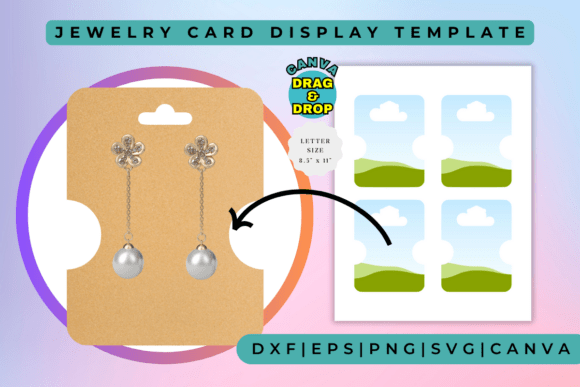
When you sell handmade jewelry, the unboxing experience is almost as important as the piece itself. That small piece of cardboard holding your earrings or necklace isn't just a functional necessity; it is a billboard for your brand. However, getting professional-looking packaging printed usually requires large minimum orders and significant upfront costs. This is where the Jewelry Card Display Template changes the game. It bridges the gap between a professional brand identity and the reality of running a small business or creative hobby. By using a digital asset like this, you gain the ability to control your aesthetic without waiting for a print shop's turnaround time.
It is crucial to understand the nature of this product right away: THIS IS A DIGITAL ITEM. NO PRINTED ITEM WILL BE SHIPPED TO YOUR HOME. You are purchasing a design file, specifically a Canva frames template. Canva frames templates are design layouts that feature a variety of frames and borders to help you showcase your photos, artwork, or other visual content in an elegant and stylish way. Think of these templates as the skeleton of your design. They provide the structure, the cut lines, and the placeholder areas, while you provide the creativity and the brand assets. These templates come in a wide range of styles and themes, including modern, classic, vintage, and more, so you can find the perfect frame to match your aesthetic.
The Power of a Professional Display
In the crowded world of e-commerce and craft fairs, visual hierarchy matters. When a customer looks at a display of earrings, their eyes naturally scan for patterns and organization. A cohesive set of jewelry cards creates a sense of legitimacy and professionalism. Using a high-quality template ensures that your fonts are legible, your logos are placed correctly, and your spacing is consistent. This consistency is a cornerstone of modern typography and brand identity. When every card looks uniform, it signals to the buyer that you pay attention to details—a trait they will assume extends to the craftsmanship of your jewelry.
The versatility of these digital files is a massive advantage. Because they are designed for Canva, they are fully editable. You don't need to be an expert in Adobe Illustrator or InDesign to make changes. If you decide to rebrand your colors or change your website URL, you simply open the file, make the adjustments, and export a new PDF for printing. This flexibility allows you to adapt to trends quickly. Whether you are launching a summer collection with bright, playful colors or a winter line with deep, moody tones, the template adapts to your vision. It is a perfect example of how digital design assets streamline the creative process for small business owners and designers.
Practical Applications Beyond the Jewelry Box
While the primary function is packaging, thinking outside the box—or in this case, the card—can maximize your investment. The core concept of a "frame" is to highlight content. Therefore, these templates can be repurposed for various marketing materials.
- Social Media Graphics: Use the frame structure to create cohesive Instagram posts or Pinterest pins. The borders can help contain text overlays, making your promotional images easier to read as users scroll.
- Business Cards: If you are just starting, a jewelry card template can often be resized to serve as a unique, vertical business card that stands out from the standard horizontal stack.
- Hang Tags: For clothing or larger accessories, the design principles remain the same. Adjust the dimensions slightly to create hang tags that match your jewelry cards, ensuring a unified brand look across all merchandise.
- Thank You Notes: Customers appreciate a personal touch. Using the same design framework for a small insert card that says "Thank You" reinforces your brand identity one last time before the customer even wears the jewelry.
This adaptability is what makes the item a valuable asset. Perfect for content creators, small business owners, and designers, these frames make it easy to create standout visuals in minutes. From minimal to playful, our wide range of styles suit any niche — whether you’re designing social media posts, product promos, or client projects.
Choosing the Right Style for Your Brand
Selecting a template is not just about picking a pretty picture; it is about strategy. You need to evaluate the personality of the frame against the personality of your jewelry. A modern, geometric jewelry card with sharp lines and sans-serif typography suits minimalist silver jewelry or industrial-style pieces. Conversely, a template with vintage flourishes, script fonts, and soft borders is ideal for bohemian or romantic styles.
When evaluating the fit, consider the "negative space"—the empty area around your jewelry. If your pieces are intricate and detailed, a cleaner, simpler card design is usually best to avoid visual clutter. If your jewelry is simple and understated, a more decorative frame can add the necessary visual interest. This balance is critical in editorial design and packaging design alike. The goal is to create a focal point, and the card should support the product, not compete with it.
Execution and Final Touches
Once you have selected your Jewelry Card Display Template, the execution phase is straightforward but requires care. The drag-and-drop nature of Canva makes the process accessible to everyone. You can upload your logo, change the background color to match your brand hex codes, and type in your social media handles or website URL.
However, before you send the file to your home printer or a local print shop, pay close attention to readability. A common mistake is using light-colored text on a light background or dark text on a dark background. Ensure there is enough contrast. Also, check the resolution. Since these are high-resolution and scalable assets, they should print crisply, but always check your printer settings to ensure you are printing at the highest quality setting on the correct paper stock. Cardstock between 80lb and 110lb is generally recommended for a sturdy feel that doesn't bend easily.
Ultimately, a Jewelry Card Display Template is more than just a file; it is a tool for empowerment. It allows independent creators to compete with larger brands by presenting their products with a level of polish that builds trust. By leveraging these digital resources, you can focus less on the logistics of design and more on what you do best: creating beautiful things. ✔ Fully editable in Canva ✔ Drag & drop ready ✔ High-resolution and scalable. Start designing like a pro — no design skills needed!