Elevate Senior Portraits: 150 Graduation Photography Backdrops
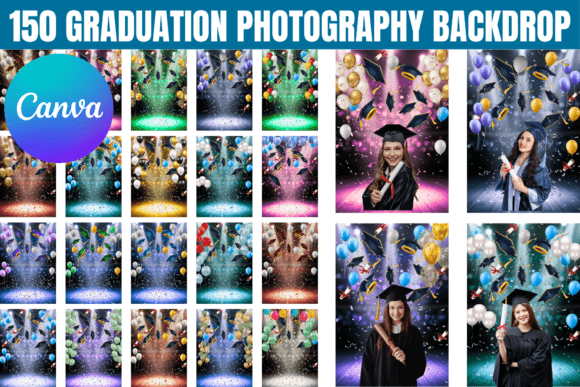
Creating standout graduation portraits often hinges on finding the right setting. Not every studio has access to a dozen unique locations, and coordinating outdoor shoots can be unpredictable. This is where the 150 Graduation Photography Backdrops bundle becomes an essential asset. It’s a curated collection of digital backgrounds designed to give photographers and creators immediate access to a wide variety of styles, from classic studio looks to textured fine-art scenes. Each backdrop is fully editable within Canva, offering a practical solution for producing polished, professional results without complex software.
Understanding the Collection's Visual Range and Appeal
This bundle is more than just a set of static images. It’s a toolkit built for versatility. The collection includes 150 graduation photography backdrops that span multiple aesthetic directions. You’ll find clean, minimalist studio backgrounds with subtle gradients, richly textured surfaces that mimic canvas or watercolor paper, and themed designs incorporating celebratory elements like confetti or subtle graduation icons. The personality of the collection is adaptable—it can be elegant and serious for formal announcements or vibrant and modern for social media content. The overall appeal lies in its breadth; it’s designed to match different portrait styles, lighting setups, and creative visions.
As a digital design asset, its strength is in the details. Each file is structured for high-resolution output, ensuring backgrounds don’t pixelate when scaled for prints, posters, or large banners. The Canva-editable format is particularly helpful. It removes the barrier of needing advanced skills in Adobe Photoshop or Illustrator. A photographer can quickly adjust a background’s color palette to complement a subject’s gown, or a student can overlay text for a graduation announcement directly in the browser. This accessibility is a core part of its value proposition.
Practical Applications Beyond the Studio
While the primary use is for senior portraits, the utility of these graduation digital backdrops extends far. For photographers, they streamline the workflow. Instead of scouting and shooting dozens of locations, you can offer clients a varied portfolio from a single studio session. The backdrops serve as consistent, reliable settings that you control completely.
For designers and content creators, the applications are broad:
- Brand Identity & Marketing: Use a textured backdrop as a background for a school’s social media campaign or a tutoring service’s promotional graphics. A consistent, professional backdrop helps build visual recognition.
- Editorial and Publishing: Yearbook committees and student magazines can use these backgrounds to create cohesive layouts for portraits and event coverage, ensuring a unified look throughout the publication.
- Event Decor and Invitations: Customize a backdrop for digital invitations, ceremony programs, or even printed table decorations. The resizable nature allows adaptation for any format.
- Personal Projects: Students and families can create personalized graduation announcements, thank-you cards, or photo collages for social media, giving their personal milestones a professional touch.
The bundle functions much like a premium font family in a designer’s toolkit. Just as a versatile typeface offers various weights and styles for different contexts, this collection offers visual “weights”—from bold and graphic to soft and subtle. Choosing the right backdrop is similar to choosing a font pairing for a logo; it needs to support the main subject without overwhelming it, enhancing the overall composition and readability of the image.
Guidance for Selection and Implementation
With 150 options, selection can feel daunting. A practical approach is to start with the project’s goal. For a formal, timeless portrait, lean towards the clean studio styles or subtle fine-art textures. For a more dynamic, contemporary feel, explore the backgrounds with modern layouts or bold color blocks.
When evaluating fit, consider these factors:
- Subject Coordination: Look at the dominant colors in your subject’s attire or props. Choose a backdrop that complements or provides a pleasing contrast. The Canva editor makes it easy to tweak hue and saturation to match.
- Lighting Consistency: If your portrait was shot with directional light, ensure the backdrop’s shading aligns. Many of the textured backgrounds have a consistent light source baked in, which helps with realism.
- Readability and Hierarchy: If you’re adding text for an invitation or poster, ensure the background doesn’t compete. A busier texture might require a semi-transparent overlay or a solid color panel to make text legible—much like how a sans serif font often pairs best with a heavily textured script font for clarity.
- Testing at Scale: Before finalizing, test the backdrop at the intended output size. Check for visual noise or patterns that might become distracting on a large print.
This collection is a commercial font equivalent for backgrounds—it’s licensed for both personal and commercial use, which is critical for photographers and designers working with clients. Always review the specific license terms included with your purchase. The instant digital access means you can start integrating these design assets into your workflow immediately, whether for a client’s graduation shoot, a school’s marketing materials, or your own creative portfolio. By treating these backdrops as adaptable tools rather than fixed images, you unlock their full potential to bring professionalism and cohesion to a wide range of projects.