Mastering Vinyl Record Design with a Canva Template
There’s something undeniably magnetic about a 12-inch vinyl record. It’s more than a music medium; it’s a piece of art, a nostalgic artifact, and a statement of taste. For designers, musicians, and brands, replicating that classic, tactile appeal in digital or print projects can be a challenge. That’s where a well-crafted 12 Inches Vinyl Record Canva Template becomes an invaluable design asset. It provides the perfect foundation for creating authentic, eye-catching vinyl graphics without starting from a blank canvas.
Anatomy of a Professional Vinyl Template Set
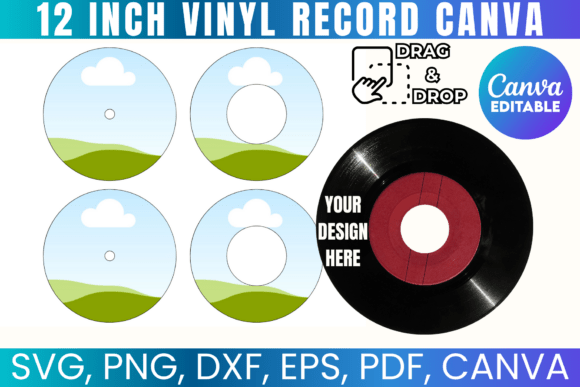
A comprehensive template set is more than just a circle with a hole. It’s a layered system designed for flexibility. The core visual characteristics are rooted in authenticity: precise grooves, accurate label proportions, and realistic center spindle details. The personality is one of vintage charm meets modern utility. The style leans into the rich, tactile feel of physical media, making it ideal for projects that need to convey authenticity, craftsmanship, and a connection to music culture.
The true value lies in the included file formats. A SVG file is crucial for crafters using Cricut or Silhouette machines, allowing for precise cutting of vinyl stickers or decals. The PNG with a transparent background is a web designer’s best friend, perfect for layering onto album art mockups or social media posts. The DXF and PDF formats ensure compatibility across a wide range of software, from professional design suites to basic editing tools. This multi-format approach ensures the template isn’t just for one type of creator; it’s a universal tool.
From Concept to Creation: Real-World Applications
The applications for a 12 Inches Vinyl Record Template extend far beyond simply making a fake record. For music producers and indie labels, it’s a direct path to creating professional-looking record label sticker templates. You can design the label, test color palettes, and present a cohesive product vision to clients or for your own marketing materials before pressing a single copy.
Content creators and bloggers can leverage the template for stunning social media graphics. Imagine an Instagram post promoting a new playlist, featuring a custom-designed vinyl record that visually represents the mood of the music. The drag-and-drop Canva editable functionality makes this process incredibly efficient. For packaging designers, it offers a quick way to mock up sleeve art concepts or create promotional inserts. The template acts as a display font for visual ideas, immediately communicating “music” or “retro” to the viewer.
For small business owners and crafters, the commercial license opens up tangible opportunities. Using the SVG file with a cutting machine, you can produce and sell physical products like custom vinyl record wall art, personalized coasters, or unique sticker sets. The ability to create a custom vinyl personalized item is a powerful selling point, allowing customers to own a piece of bespoke art.
Strategic Design: Pairing, Hierarchy, and Brand Perception
Using this template effectively is about more than slapping an image onto a project. It’s about understanding visual hierarchy and brand alignment. The record itself acts as a strong central graphic, a visual anchor. The label area, however, is where your typography skills come into play. This is where you choose your font pairing.
A classic serif font might evoke vintage jazz or soul, while a bold, clean sans serif font could lean into modern electronic or indie rock aesthetics. A script font or handwritten font on the label adds a personal, artisanal touch perfect for singer-songwriter projects or boutique brands. The template provides the structure; your typography choices define the personality.
Consider the overall brand identity. A coffee shop using this template for a loyalty card design or a menu accent is communicating a certain vibe—cool, curated, and culturally aware. A wedding stationery designer using it for a couple’s “first dance song” keepsake is tapping into deep nostalgia and personalization. The template influences brand perception by instantly associating the project with the rich, tactile world of vinyl.
Practical Guidance for Seamless Integration
Before diving in, evaluate your project’s needs. Is this for a digital design or a physical print project? The answer will determine which file format you start with. For quick edits and social media, the Canva link is your fastest route. For precision cutting or integration into a larger print layout in Adobe Illustrator or CorelDraw, the SVG or PDF is superior.
Test your font pairings directly on the label within the template. The small surface area is a great test of readability. Avoid overly ornate script fonts that become illegible at a small size. Ensure there is enough contrast between the label background and your text color. This small area is critical for visual hierarchy—it should clearly state the artist, album, or key message.
Remember the licensing terms. This is a commercial font and template for personal and small business use. You can create and sell physical products, which is a significant advantage. However, you cannot resell the digital template files themselves. This protects the asset’s value while empowering you to build your own products upon it.
Ultimately, this 12 Inches Vinyl Record Canva Template is a bridge between digital convenience and analog soul. It’s a practical design asset that saves time, ensures accuracy, and unlocks creative possibilities across marketing, branding, crafting, and personal projects. By understanding its components and applying thoughtful design principles, you can transform a simple template into a powerful tool for visual storytelling and brand building.