17 Witch Canva Frame Template Set: Your Halloween Design Toolkit
What Exactly Is This Witch Canva Frame Template Collection?
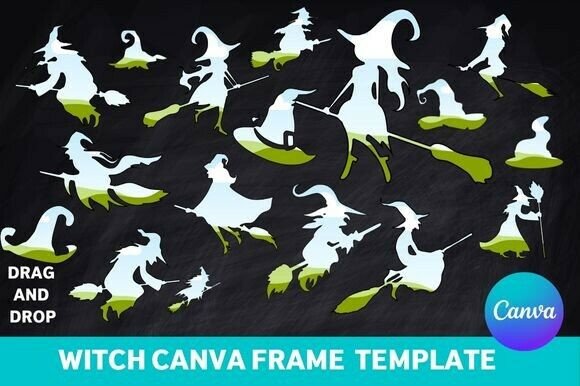
Think of these frames as ready-made windows into a spooky, whimsical world. This set gives you 17 distinct designs, each built around classic witch imagery. You get silhouettes of witches on broomsticks, pointy hats, bubbling cauldrons, crescent moons, and intricate potion bottles, all shaped as picture frames. The visual style leans into a blend of playful spookiness and vintage charm. It’s not overly gory or terrifying; instead, it evokes the nostalgic, slightly kitschy feeling of classic Halloween decorations. The personality is fun, magical, and inviting—perfect for creating designs that feel festive without being frightening.
The appeal lies in its directness. These are not abstract decorative elements; they are functional design assets. The frames are designed with a clear purpose: to hold a photo or a piece of text. This makes them incredibly practical for a range of projects. The overall aesthetic is consistent across the set, which helps maintain a cohesive look if you’re using multiple frames for a single event or campaign. It’s a focused toolkit, not a sprawling, unfocused collection.
Where Do Witch-Themed Frames Actually Work Best?
The immediate and most obvious application is for Halloween invitations. Whether it’s a kid’s party, a neighborhood gathering, or a themed corporate event, dropping a fun photo into a witch-hat-shaped frame instantly sets the tone. The same logic applies to social media graphics. A quick Instagram Story announcement for a Halloween sale or a Facebook event cover gets an instant thematic boost. For small business owners, this is a low-effort way to participate in seasonal marketing without commissioning custom illustration design from scratch.
Beyond digital, the value extends into physical projects. Scrapbook pages dedicated to past Halloweens gain a focused decorative element. Crafters can use the frames for DIY projects like custom place cards, treat bag tags, or party favor labels. The set is marketed as ideal for printable projects, which is accurate. Think of designing a menu for a Halloween dinner party or creating a set of themed thank-you notes. The frames provide a ready-made structure that simplifies the layout process.
For content creators and bloggers, these frames offer a quick way to generate thematic featured images or Pinterest graphics for seasonal content. A blog post about “10 Spooky Cocktail Recipes” becomes more visually engaging when paired with an image framed by a cauldron silhouette. The key is recognizing that this isn’t a brand identity font; it’s a seasonal toolkit. Its strength is in providing a burst of thematic energy for short-term, project-based use.
How to Get the Most Out of These Customizable Templates
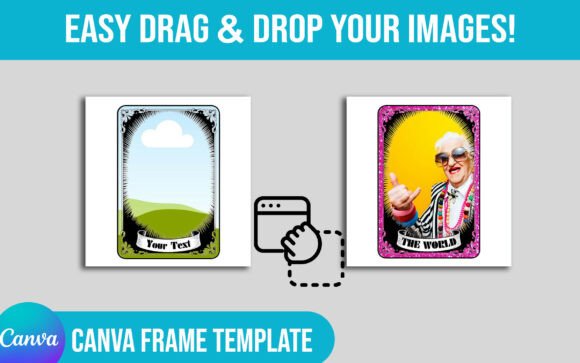
The core promise is easy drag-and-drop use in Canva. That’s not hyperbole. Once you upload the template set to your Canva account, each frame is a separate, editable element. You select the frame, upload your photo, and drag it into the designated area. Canva handles the masking. The templates are described as fully customizable, which typically means you can change the color of the frame elements, resize them, and reposition them within your canvas. This flexibility is crucial for matching your project’s existing color scheme or for creating contrast.
A practical tip: don’t just use them as literal photo frames. Experiment. Use the frames as shapes for text blocks. Place a short, punchy headline inside the silhouette of a witch. This can create a strong focal point in a social media graphic or on a party poster. Think about visual hierarchy. The frame naturally draws the eye, so use it to highlight the most important piece of information in your design—whether that’s a photo, a date, or a call to action.
When evaluating fit, consider your audience. If you’re designing for a family-friendly event, the whimsical style is perfect. For a more sophisticated adult Halloween party, you might want to use the frames more sparingly, perhaps as a subtle accent rather than the dominant design feature. Test how the frame interacts with your chosen typography. A bold, simple sans serif font for details will likely complement the decorative frames better than an overly ornate script font, which could create visual clutter. The goal is balance—the frame adds the theme, while the typography delivers the information clearly.
Finally, remember the practicalities. These are high-quality templates, but always check the licensing terms included with your purchase for any commercial use. They are designed for a specific, seasonal purpose. Using them year-round would dilute their impact. Their real power is in making your Halloween-themed projects faster to create, more visually consistent, and genuinely fun. They solve a specific design problem with a focused, charming solution.