Design Your Own Bookmarks: A Canva Bookmark Template
There's a specific kind of satisfaction in holding a well-designed bookmark. It's a small object, but it carries a lot of weight—marking a place in a story, holding a thought, or serving as a tiny piece of art. For creators, entrepreneurs, and book lovers, the ability to design these personal items without a steep learning curve is a game-changer. The Canva Bookmark Template, Canva Editable is built for exactly this purpose. It’s not a font, but a comprehensive design asset that puts professional-quality bookmark creation directly into your hands, leveraging Canva's familiar drag-and-drop interface.
More Than a Template: A Complete Design Toolkit
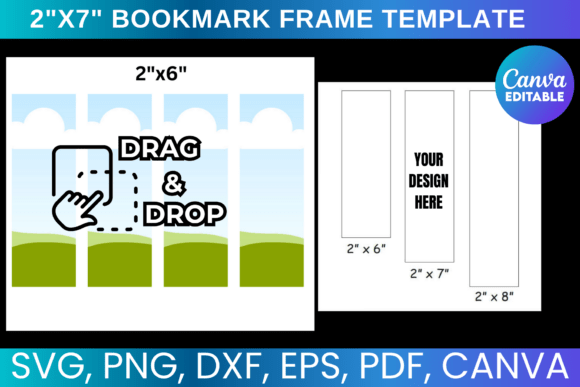
At its core, this template package is about flexibility and professional output. It provides a foundational design file accessible through a direct Canva link. Once in Canva, you can completely customize every element: swap out colors, change fonts to match your brand or personal style, add your own illustrations or logos, and incorporate text. The visual personality of the template is clean and modern, serving as a versatile starting point that can be dressed up to feel elegant, whimsical, minimalist, or bold depending on your choices.
The true value, however, lies in the included digital download files. You aren't just getting an editable Canva link. You receive a suite of production-ready formats:
- SVG and PNG files for use with cutting machines like Cricut and Silhouette, allowing you to create physical, die-cut bookmarks.
- A DXF file specifically optimized for Silhouette Studio software.
- A PDF file with a solid white background, perfect for standard home or professional printing.
This transforms the template from a simple on-screen design into a multi-platform design asset ready for any output method.
Where This Template Shines: Real-World Applications
The applications for a customizable bookmark template extend far beyond a personal reading accessory. Think of it as a small-format canvas for brand identity and marketing.
For Small Business Owners & Entrepreneurs: A beautifully designed bookmark makes a memorable packaging design insert for online orders. Tuck one into every shipment as a thank-you note, a discount code carrier, or a brand reminder. It feels personal and high-quality, elevating the unboxing experience and reinforcing your brand's professionalism.
For Authors, Publishers & Bloggers: Bookmarks are a staple of editorial design and reader engagement. Use the template to create promotional bookmarks for a book launch, a giveaway for newsletter subscribers, or a thoughtful gift for beta readers. The consistent use of your book cover's typography and color scheme on a bookmark strengthens visual hierarchy and brand recognition.
For Crafters & Gift-Makers: The ability to produce unique, physical items is at the heart of this tool. Design a set of bookmarks as personalized gifts for a book club, wedding favors for a literary-themed event, or items to sell at a local craft fair. The included SVG and PNG files make the jump from digital design to physical product seamless.
For Designers & Marketers: This template is a practical solution for creating social media graphics or digital freebies. Offer a beautifully designed, downloadable bookmark as a lead magnet on your website. It's a tangible piece of value that can help grow an email list while showcasing your design sensibility.
Integrating the Template into Your Workflow
Using this Canva Bookmark Template, Canva Editable is straightforward. After purchase, you gain instant, lifetime access to the download. The first step is to open the Canva link, which creates a copy of the template in your own Canva account. From there, the creative process begins.
Consider the following practical steps to ensure a successful design:
- Evaluate Your Project's Needs: Before diving in, clarify the bookmark's purpose. Is it for a corporate client? A personal project? This will guide your font choices, color palette, and overall style. A serif font might convey tradition and literary quality, while a clean sans serif font feels modern and approachable.
- Customize with Purpose: Use Canva's vast library to find the perfect font pairing. For example, pair a strong display font for the title with a readable script font or a simple sans serif for supporting text. Add your logo, a quote, or a custom illustration. The goal is to create something that feels authentically yours.
- Test Readability and Visual Hierarchy: A bookmark is a small space. Ensure your main message or graphic is the focal point. Use size, weight, and color contrast to create a clear visual hierarchy. Zoom in and out on your screen to check that the design remains balanced and legible at its final printed size.
- Choose Your Output Format: Once the design is complete, export it from Canva as a high-quality PNG or PDF for printing. If you plan to use a cutting machine, download the appropriate file (SVG, PNG, or DXF) from the provided package and import it into your machine's software, like Cricut Design Space.
This template package respects your time and investment. It’s a one-time download with no recurring fees, giving you a permanent tool to create bookmarks whenever inspiration strikes. The usage terms are clear: you are free to use the designs you create for personal or commercial purposes, such as selling the physical bookmarks. The restriction is on reselling or sharing the original digital template files themselves, a standard and fair practice for digital download products.
In a world of digital overload, a physical, thoughtfully designed bookmark stands out. This template provides the practical framework to create that tangible connection, whether for your business, your creative project, or simply for the love of books. It puts the tools of a graphic designer into the hands of anyone with a Canva account, making professional-quality design accessible and actionable.